Showing posts with label nosql. Show all posts

Wednesday, 15 February 2012

On the Subject of NoSQL (and a bit about graph databases)

Pretty formal-sounding title, yeah?

(I'm likely just suffering from title-writers' block.)

So, before I dive head-long into an actual graph database, it's probably a good idea to briefly discuss what makes a graph database a graph database.

RDBMS

For the past 30+ years, the world of databases has been primarily dominated by the colossus that is relational databases (i.e. RDBMS, or Relational DataBase Management System).  RDBMSes are well-known and well-studied, but it suffices to say that they can be used to model almost any kind of information (that is, RDBMS can be used to model a broad, general set of data).

I'm going to assume that the reader is familiar with basic RDBMS concepts like columns, rows and tables.  Information in an RDBMS is grouped into similar entities that can have relationships between them.  In this way, we can model just about any situation in this single kind of database.  For example, you can model everything from a school (teachers, classrooms, students, schedules, etc.) to an online business (products, orders, inventory, etc.).

Because each table consists of rows and each row is made up of columns (columns representing the types of information you want to store), we know what kind of data to expect in each table and database based on its schema.  This is great for ensuring that you don't try to save a product's name when it's expecting the product's price.

RDBMSes are also good for both looking up information as well as handling the storage of data.  The concept of transactions is important; just as businesses need to deal with transactions every day, so to does a database that is used to enter in data of a transactional nature (e.g. payments, orders).

Another important feature of any RDBMS is the ability to query the data.  SQL (Structured Querying Language) is almost as old as RDBMSes themselves and is a powerful tool for looking up and modifying data in an RDBMS.  It might not be the most efficient tool on its own given the potential complexities of how a specific database is laid out (see: query analyzers and optimizers), but it can be tuned to be a very powerful tool with the right indices setup and the right query.  (SQL can also be prepared/compiled in some cases, but we won't get into that.)

So why use one of these so-called NoSQL databases?

NoSQL

Without going into too much detail about NoSQL (that's another post or ten on its own), NoSQL is really better off being called NoREL (i.e. non-relational model, though that's more in the traditional RDBMS sense).

Whereas RDBMSes are geared towards being a general solution for almost any model, it does everything fairly well but requires specialized tuning in order to make it run really well, and it comes at the expense of some areas being better and others becoming "worse" as a result.  For example, it's difficult to make a database that is tuned for efficiently handling a high volume of transactions be efficient at also handling speedy look-ups and reads for data.

NoSQL databases provide specializations that RDBMS systems can't provide.  They come out of the box ready to be super-good at one or two areas, but not to so great in others.  Think of them as pre-tuned databases, and one size definitely does not fit all.

NoSQL databases range in types from document-stores (e.g. CouchDB) to key-value stores (e.g. MongoDB) to graph databases (e.g. Neo4j), to name but a few types.  (A decent breakdown of NoSQL database types can be found here and here.)

You could likely tune an RDBMS to be quite good at a number of things, but it's a bit of a pain (trying to setup and tune proper indices is a painful and involved process).

This is partly why I disagree wholly with those who say NoSQL heralds the death of RDBMS.  Quite the contrary: I see NoSQL databases as being an excellent complement to RDBMS.

Another advantage of NoSQL databases is the fact that most of them are schema-less; that is, they can store arbitrary information without the need to structure it.  This can be very powerful when modelling heterogeneous information in a database.  It can also allow for the evolution of your data models without the need to completely overhaul and change your database (anyone who's tried to do that before with an in-production database knows just how painful that is).

NoSQL databases also tend to scale very, very well, often times easier than clustering together an RDBMS-based solution.

One point worth mentioning is the fact that RDBMSes are traditionally known as what is called ACID compliant.  ACID (which stands for Atomicity, Consistency, Integrity, Durability) is a very important concept for databases that handle transactional information (and most businesses do).  A discussion on ACID is well outside the scope of this post, but, ACID compliancy is commonly lacking in most NoSQL databases (most of them subscribe to the principle of Eventual Consistency).  This is definitely worth noting and keeping in mind when choosing a NoSQL database to use.  A great example of an exception to this is the fact that Neo4j (a graph database) is, in fact, ACID compliant.

(If anyone wants an actual discussion on ACID vs. Eventual Consistency and why it's important, let me know and I'll see about putting an article together.)

Graph Databases

As far as graph databases are concerned (took me long enough to get here), I strongly suggest going to this link and checking out "What is a graph database?" and "Comparing Neo4j" tabs on the page.  It does a wonderful job of explaining what a graph database actually is (big surprise) and how graph databases relate to other types of databases (both NoSQL and RDBMS).

While you do need to typically index nodes and relationships for searching (e.g. full text searches over properties), strictly speaking a graph database is one that provides "index-free adjancency" (source: http://en.wikipedia.org/wiki/Graph_database).  This means that each element (i.e. node) has a link to its adjacent elements to follow--no index look-ups are necessary.

Graph databases are a great way of representing graphs (remember those things with nodes and relationships?).  Graphs in a graph database typically consist of arbitrary nodes and relationships.  Each node and relationship can have assigned to it an arbitrary number of properties.  Properties are simply key-value pairs of information (e.g. "Name" = "Joe" and "Age" = 30).

So you can easily represent a family tree, a network diagram, or even a social network with a graph database.  For example, think of two nodes, each one representing a friend at work (call them Jason and Scott), and a relationship between them (representing their friendship).  So, each node would have properties like, "Name"="Jason", "Age"=30, etc.  The relationship between them could be labelled "KNOWS", and that relationship could have properties like "Since"="01/01/2001" and "At"="Acme Inc.".  All of a sudden, we now have a way to track friends, find out who knows whom, when they met, and where they met.

Now let's say somewhere down the line we learn something else about each person; say, Jason's birthday.  It's very easy to add a new property to Jason's node.

We begin to see the power of graph databases very quickly.

We can use graph databases in many ways, including (but definitely not limited to):
  • Recommend products to buy based on a user's purchase history (follow a graph from a product someone has bought back through another user that's bought the same product and then on to another product that other user has also purchased).
  • Find out just how popular someone is (look at the number of relationships that person's node has).
  • See what geographic locations have the most users in it.
  • Find out if you know the CEO at a powerful company through a friend (you can always use more friends!).
This is why sites like Amazon and LinkedIn are so powerful.  Think about how they might use a graph database.

Ok, that's enough for now.  I keep thinking I can write short posts on this stuff, but, there's just so much!

As always, I'm sure there's plenty more I haven't covered, but if you'd like to see anything else put up here (or clarified), just let me know.  I'm always looking for ways to improve how I organize and present this information.

Peas!


Neo4j: First Blood

That's one serious-sounding title.

This post is about my first foray into the graph database world.  I chose as my first victim/offering Neo4j.  I'll likely end up writing more than a few articles about this particular database, but, I thought I'd start with the basics, including the following:
  • Download
  • Installation
  • Configuration
  • Poking around
(And yes, "poking around" is a sanctioned technical term.)

So, a bit about Neo4j to start!
  • It's been around since 2007.
  • NUMBER ONE SELLING POINT FOR ME: It's ACID compliant!  Not too many NoSQL engines that I've seen (yet) are, though for various reasons that are well outside the scope of this post.
  • As you may have guessed, it's primarily meant for integration with Java.
  • It can also be integrated with Spring (a big plus, if you ask me) via Spring Data (POJO development FTW!).
  • Its API is REST-based, and so can be utilized by just about any platform (though you'll likely have to write your own wrapper, unless you can find one out there in the open source world).
  • There are some ready-made wrappers for some platforms available, such as Python and Ruby.
  • It's available for Windows, MacOS and Linux-based OSes.
  • It's available in both 32-bit and 64-bit for Windows and Linux.
  • It's available in 3 versions, including the Community version, the Advanced version, and the Enterprise version.  As you'd expect, the Community version is open source available under GPL (the other versions are covered under AGPL).
  • It comes ready-to-run with a version of the web/app server Jetty.
  • It comes with a built-in web admin console (hence the need for Jetty).
  • Following in the NoSQL tradition, it scales very well for Big Data.\
  • Its name lends itself well to any number of The Matrix jokes.
I strongly suggest going to their website (www.neo4j.org) to do a little research of your own.

Download

Given that I'm just looking to get my feet wet with Neo4j, I downloaded the Neo4j v1.6 Community Edition 64-bit Linux package from my ready-made VM (coincidentally named Morpheus) running CentOS (sorry Windows users).  Read: I can't be bothered downloading the source and compiling it.  Note that Java 1.6+ is required; a complete set of requirements can be found here.

The archive is only about 37MB (give or take) and so completed relatively quickly over my bonded DSL connection.

Installation

After un-tarring the package and moving it into an appropriate directory (I'm a sucker for /etc) and starting the Neo4j server from the command line via bin/neo4j start (don't worry; there's a README.txt in the root of the installation directory that has all the quickstart instructions in it), I was ready to rock!

(I should note that I did get a couple warnings, shown below, but it hasn't seemed to have affected anything just yet, likely given how small my current graph is.

WARNING: Detected a limit of 1024 for maximum open files, while a minimum value of 40000 is recommended.
WARNING: Problems with the operation of the server may occur. Please refer to the Neo4j manual regarding lifting this limitation.
)

Or so I thought.

Configuration

If there's one bone of contention I have with Neo4j, it's that finding the appropriate (and up-to-date) documentation for the config files takes a bit of digging (it's not impossible by any stretch, though).

As I quickly found out, trying to access the web admin console that comes with Neo4j (very handy, I must say) outside of localhost is a non-starter out of the box.

Did I pack it in for the day and go back to flipping through Steam for cheap games?  No!  I did some "research".

Here's the solution: In order to get Neo4j's web admin to work from somewhere outside of localhost, change the neo4j-server.properties in the install directory's /conf directory (go figure).

Commented out towards the top of the file is the property org.neo4j.server.webserver.adddress".  Uncomment it and change it to the IP you want to bind the server to (the property does note that there are security concerns to consider, so, you may want to consult the Neo4j documentation before doing this).  

You can also change other settings in this file, e.g. getting it to work over HTTPS, changing the default ports for each, etc.

(Note: The web admin defaults to running over HTTP on port 7474 and over HTTPS over 7473.)

So, after making the change to the appropriate IP and restarting the Neo4j server, I tried pointing my browser back at the Neo4j web admin.

Success!


Poking Around

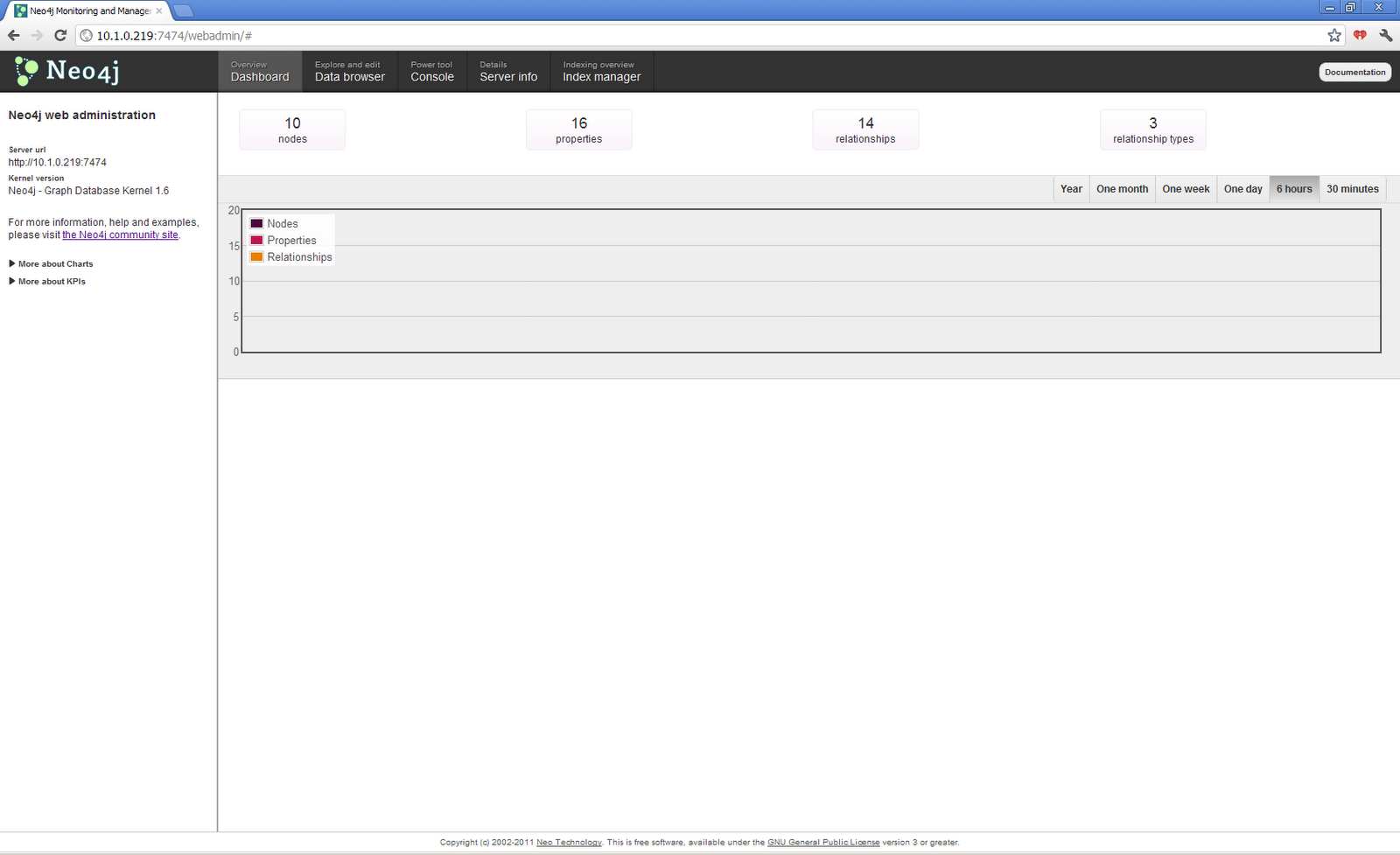
Without going in to too much detail (I'll likely do that in subsequent posts), the Neo4j web admin has 5 distinct sections to help manage your installation:
  1. Dashboard
  2. Data browser
  3. Console
  4. Server info
  5. Index manager
Each one is fairly self explanatory.

The dashboard provides at-a-glance information about your server over a specified time line, such as the total number of nodes, properties, relationships and relationship types.

The data browser allows you to perform basic CRUD operations via a GUI.  You can also perform look-ups (consult the Help icon immediately to the right of the search button for more details on exactly what you can search for).  In other words, you can create a graph right then and there.

You can also flip the view to a graphical representation of the current graph and manipulate it (via click-and-drag) directly.  This is perhaps the coolest part of the web admin console (hey, we all like cool features!).


That's some serious badassery right there.

Next we have the console.  This is a great way to get familiar with the languages used to query Neo4j, including HTTP (i.e. accessing the REST calls), Gremlin (a Groovy-based querying language becoming common across multiple graph databases; it seems to be mainly for those coming from a math/graph background), and Cypher (Neo4j's own querying language; it seems to be mainly for those coming more from an SQL background).  

A quick note: At the time of this writing, Cypher only allows for read-only queries, whereas Gremlin allows for both reading and writing.

Next up, server info.  This is just a way to view (read: read-only) the server's configuration information.  No biggie.

Finally, we have the index manager.  Now, this is something I'm sure I'll be getting into a lot more as time goes on.  It's worth noting that Neo4j is built using the Lucene project for indexing, so this is very promising (especially for those familiar with Lucene and/or Solr). This makes a great deal of sense given the concept of properties for each node (full text search is going to be very important).

Regardless, you can create and manage indices for both nodes and relationships here.

So there we have it: My first venture into graph databases.  I'll admit I picked Neo4j first based on my initial research into graph databases.  It does seem to be the most popular graph database at the moment, so I look forward to seeing what it can do.

In subsequent posts, I'll be monkeying around with the querying languages, creating and modifying graphs, messing around with indices, and all kinds of other good stuff.

I hope some of you out there found this somewhat useful/informative/cool.  Well, I know I found it cool, but then I always was kind of odd...

Until next time, when we'll go Graph to the Future!  (Sorry, couldn't go an entire post without making at least one movie-based pun.)

Tuesday, 14 February 2012

So, You Want to Be a Grapher?

I've managed to resist the urge to setup a blog, until now.  A good friend and colleague of mine convinced me to do this based on a discussion we had over a beer the other night (and, let's face it: that's always the best place to have such ideas).  So, Martin, thanks for that.  I think.

So, the point of this blog, you wonder anxiously?  What a great question for a segue into an introduction!

I've been working in the IT field as a software engineer for some time and am currently the VP, Technology for a downtown-Toronto based software development firm.  As such, it behooves me (what a great term) to at least try to keep up-to-date with emerging technologies, especially as they mature.

To that end, as of late, I've become fascinated with the whole NoSQL paradigm.  Having spent most of my professional career dealing with RDBMSes, I was curious as to how the whole Big Data notion fit into things.  Browsing through the myriad niches of NoSQL--from document-based to key-value based--and leaning more about the whole movement along the way, I came across one particular type of NoSQL database that really got me glued to the ceiling.

Graph-based databases.

Coming from a background in not just computer science and software engineering, but mathematics as well (I attended the University of Waterloo up here in Ontario, Canada), the graph paradigm spoke volumes to me.

Sure, my math as it pertains to graphs may be a bit rusty, but it's something I clearly remember being rather interested in (should have taken more graph theory courses...).

Even more exciting is the fact that such databases existed.  For those of us who understand (or at least know about) graphs, I think it's safe to say that we can all appreciate the representation of social networks, semantics, and other relationship-driven data, as graphs.

What hit me like a tonne of bricks (Lego or otherwise) was that graph-based databases have actually existed for some time.  How long, exactly, I'm not 100% sure yet (as an example, one such database is neo4j which has been around since 2007).

The fact that highly-connected data could be so easily and directly represented in technology (along with the above) is what drove me to start digging deeper.  Such data exists in abundance around the web (and elsewhere!).

So began my adventure into the realm of graph-based databases.

"What do you hope to accomplish with this blog?  What are your goals?"  Another astute question; one that I have anticipated to some degree:

  • As much as I hope to inform and educate, this blog is as much to serve as a record of my journey into graph-based databases.  I'm hoping that as I continue to learn that others may hopefully glean some knowledge/insight from my posts (however little or much that may be).
  • As stated above (I'll repeat it for the sake of being explicit), I hope to educate and inform people as the world of graph-based databases expands and matures.
  • To explore graph-based databases and their related concepts.  This may include information on other aspects of NoSQL, or even deeper dives into graph theory.
  • To give a base from which to derive a basic understanding of graphs and their databases.
I think that's about sufficient for now.  Should I need to revisit these goals, I will do so when the time comes.

If anyone actually reads these posts, I greatly welcome feedback and comments.  This blog may not be everyone's cup of tea, but, I'll take that chance.  Let's try to keep the comments at least somewhat constructive (I'm sure some out there will pick apart things that I may get wrong, but I fully expect and welcome such criticism and corrections).

For the time being, I'll link to any sources from the web that I use.  If I miss any or if people feel that I'm not citing enough, please let me know.  It is not my intention to plagiarize anyone's work as I know developing it comes with no small effort; rather, it is my intention to aggregate and disseminate knowledge wherever possible.

Ok, I think this post is long-winded enough.  The frequency with which I post remains to be seen.  While I'm sure most won't exactly be waiting with bated breath, maybe they will!

With that, I look forward to posting more soon!  Back to the grindstone!


(And Happy Valentine's Day to all of you out there!)